What makes alt text effective — and why does it even matter?
Alt text is one of the fastest ways to strengthen your website’s SEO, improve accessibility, and help search engines understand your content. The challenge isn’t the writing itself — it’s knowing what to include, what to leave out, and how to make each description meaningful.
This guide covers what alt text is, why it matters, and (most importantly) the exact steps to write it well! Whether you’re updating hundreds of product photos or adding images to your latest blog post, strong alt text should be part of your publishing routine.
What Is Alt Text Actually?
Alt text (or “alternative text”) is a short written description that explains what an image shows. It lives in your website’s HTML and is read by search engines, screen readers, and assistive technologies.
Even though users don’t always see alt text, it plays a key role in how your content is interpreted.
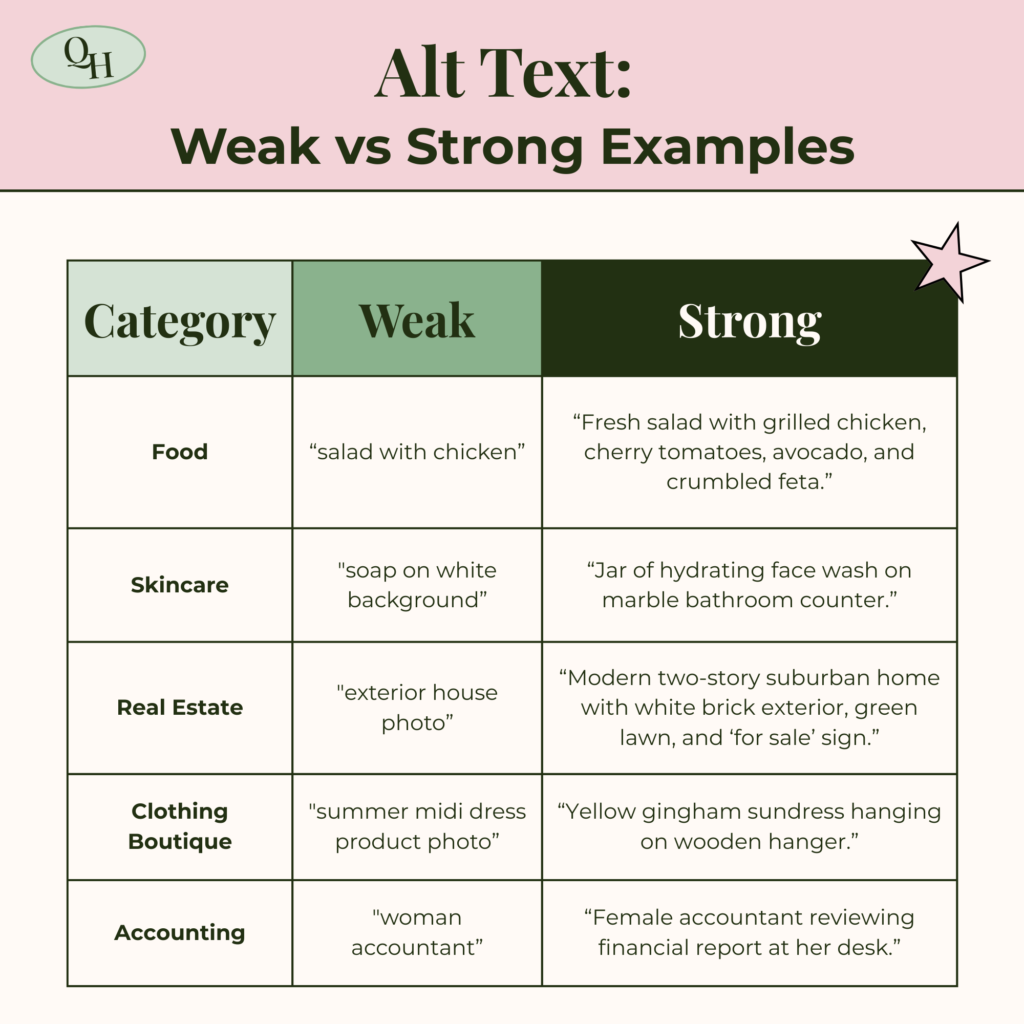
Alt text has four main functions:
- Describes images for people using screen readers.
- Helps search engines understand visual content.
- Appears when an image fails to load.
- Adds context that strengthens the topic of your page / blog.
Alt text doesn’t need to be clever or highly creative — it simply needs to be accurate, clear, and relevant to the content it supports.
Why Alt Text Matters for SEO and Accessibility
Alt text directly impacts how both people and search engines experience your site. Because Google cannot “see” images, it depends on alt text to understand what visuals contribute to the page.
SEO Benefits:
When written well, alt text can:
- Reinforce the topic of a page or blog post
- Improve visibility in Google Images
- Increase relevance for target keywords
- Provide semantic clues about what the image represents
- Strengthen your on-page SEO structure
Images also appear as standalone results — meaning strong alt text can bring in additional traffic from image search. This especially benefits e-commerce brands, recipe websites, blogs, educational content, and so much more!
Accessibility Benefits:
Alt text is also essential for an inclusive, user-friendly website. Without alt text, these users miss context and information that sighted users receive immediately.
Accessibility benefits everyone — including users with slow internet, broken images, or temporary impairments.
How Alt Text Works With Google Search & Image Search
Alt text is one ranking signal among many, but it becomes far more powerful when it aligns with the overall theme of your page. Google analyzes images using several layers of context:
Google looks at:
- Alt text: the core description of the image
- Image file name: simple, descriptive names perform better
- Surrounding text: paragraphs and captions near the image
- Headings: what the page or section is about
- Internal links: which pages point to this one
- Overall page relevance: whether the content matches the searcher’s intent
When these signals point in the same direction, Google can confidently understand what your image contributes to the page.
Why this matters
- For blog posts, strong alt text clarifies concepts for Google and reinforces the article’s focus.
- For e-commerce, alt text helps individual product images appear in search results, not just the product page.
- For service pages, alt text supports credibility by describing your work, team, office, tools, or processes.
Alt text alone won’t skyrocket rankings, but without it, a key piece of your on-page optimization is missing.
How to Write Alt Text in 5 Easy Steps
Strong alt text is both descriptive and contextual. Your goal is to ensure someone who cannot see the image can still understand why it’s there.

1. Describe what the image actually shows
Focus on the details that matter: who or what is in the image, what they’re doing, colors, format, or setting. Avoid details that don’t impact meaning.
2. Add context based on the purpose of the page
The same image may have different alt text depending on where it’s used. A stock photo of a laptop could relate to SEO audits, online courses, productivity tips, or design work.
3. Use natural, straightforward language
Write conversationally. Imagine explaining the image aloud. Avoid filler words or vague descriptions like “nice photo.”
4. Include keywords only when appropriate
If the keyword fits naturally, include it once. If you feel like you’re forcing it, remove it — keyword stuffing weakens both SEO and accessibility.
5. Keep it concise
Alt text should typically be a single sentence. Aim for clarity, not creativity or length.
Common Alt Text Mistakes to Avoid
When it comes to mastering writing alt text, it’s important to understand the most common mistakes to avoid. These errors can make your alt text less effective and even harm your SEO.
Easy mistakes to avoid when writing alt text include:
- Keyword stuffing: Adding keywords repeatedly signals low quality to Google.
- Starting with “image of” or “picture of”: Screen readers already identify the element as an image.
- Over-explaining the image: Don’t describe every object in the frame — only the details that matter.
- Writing long, caption like descriptions: Alt text should describe the image, not narrate a story.
- Adding alt text to decorative elements: Lines, shapes, icons, borders, etc should have empty alt text so screen readers skip them.
Wanting to learn more about how SEO fits in your brand’s online presence? Check out this post: Digital Marketing for SEO: How Search Powers Long-Term Growth.
Where to Add Alt Text on Your Website
Every major website platform includes an alt text field. Here’s where to find it:
WordPress
- Open the Media Library
- Select an image
- Add your description in the “Alt Text” box in the right panel
Wix
- Click the image
- Open “Settings”
- Add the text under “What’s in the image? Tell Google”
Shopify
- Open the product or page
- Select the image
- Add alt text in the image editing panel
Regardless of platform, adding alt text should be part of your normal publishing routine — especially for blog posts and product pages.
What Is Alt Text? Common FAQs
How long should alt text be?
One short, descriptive sentence — ideally under 125 characters for screen readers.
Should I use keywords?
Yes, but only when they fit naturally into the description.
Do all images need alt text?
Most content images do. Decorative visuals should be left blank.
How should I write alt text for logos?
Use something simple like “Query House Marketing logo.”
Does alt text replace captions?
No. Captions support storytelling and user experience. Alt text supports accessibility and search engines.
Should I describe text that appears inside an image?
Yes — if the text adds meaningful information, such as data, labels, or instructions.

Alt text is a foundational part of SEO and accessibility. It takes only a few seconds per image, but it strengthens how search engines interpret your content and ensures your website is usable for every visitor.
When you write alt text intentionally — not as an afterthought — you improve discoverability, clarity, and user experience across your entire site.
It’s a small habit that creates long-term impact.

Leave a Reply